
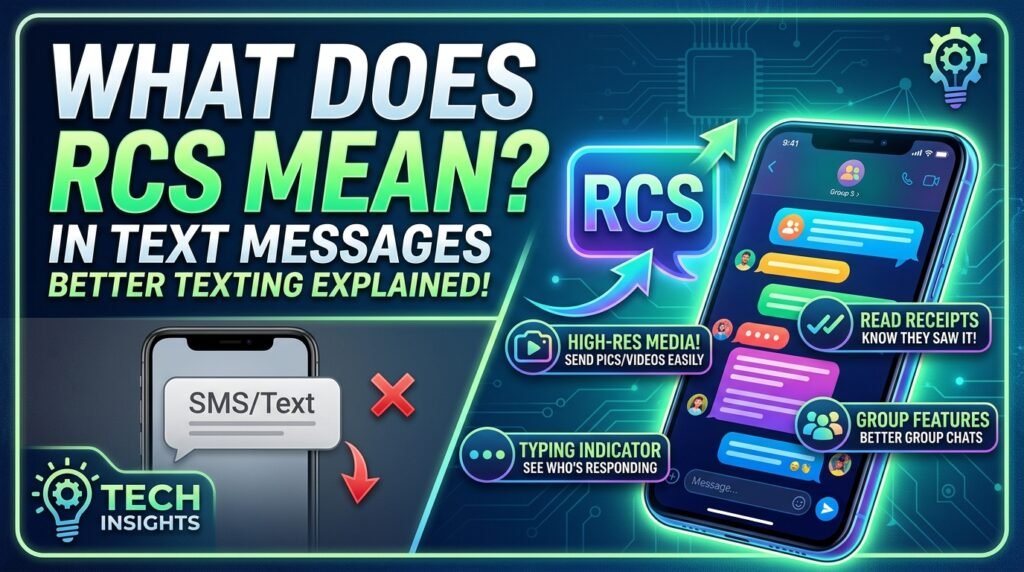

Texting has developed far beyond the basic SMS, and now incorporates many new chat tools that make chatting faster, more interactive and engaging than before. One of the newest technologies that continues to change how we communicate with one another through texting is called Rich Communication Services (RCS). If you’ve seen “RCS Chat” in your messaging app or have noticed that some of your text messages show whether they were read, that someone is typing a message, or that you can send high-quality photos, then those features are likely attributed to RCS. In this article, we’ll look at what RCS means for texting, how RCS works, its primary attributes, and how it differs from standard SMS and MMS texting.
RCS is short for Rich Communication Services and offer a significant upgrade to the simple text messaging services that we have all come to appreciate for almost 20 years. Unlike standard SMS and MMS, RCS provides new features like read receipts, high quality image sharing, typing indicators, and other improvements to group chat than what are available via the built-in text messaging application on your phone without requiring you to download an additional messaging application.
What Does RCS Stand For? The Simple Answer
RCS stands for Rich Communication Services It’s a messaging protocol basically a set of technical rules that govern how your text messages get sent and received developed by the GSMA (the global organization that sets mobile industry standards).
The concept was actually introduced in the early 2000s, but it didn’t really gain traction until around 2016–2019 when Google started pushing it hard on Android. Think of it as SMS getting a serious software upgrade. If SMS is a flip phone, RCS is a smartphone same basic idea, totally different experience.
Quick reference:
- Full name: Rich Communication Services
- Type: Messaging protocol (built into your phone’s default texting app)
- Replaces: SMS and MMS
- Requires: Internet connection (Wi-Fi or mobile data)
- Works on: Android natively; iPhone with iOS 18 or later
It’s worth noting that RCS isn’t an app it’s a standard baked into your messaging app. That distinction matters, because a lot of people assume you need to install something. You don’t.
Read More: https://garminlive.com/what-does-the-skull-emoji-%f0%9f%92%80-mean-in-text-complete-guide-2026/
How Is RCS Different From Regular SMS and MMS?
SMS Short Message Service launched in the early 1990s. It’s pure text, capped at 160 characters per message, and runs over your carrier’s cellular network. No internet required, which is why it still works in places with barely any signal.
MMS (Multimedia Messaging Service) was added later to allow photos and short videos, but it’s still built on that same old cellular infrastructure. The quality is notoriously bad anyone who’s sent a photo over MMS and watched it arrive looking like it was taken on a potato knows exactly what I mean.
RCS is different at a fundamental level. It runs over the internet Wi-Fi or mobile data and that’s what allows all the extra features.
| Feature | SMS | MMS | RCS |
|---|---|---|---|
| Requires internet? | No | No | Yes |
| Max message length | 160 chars | 300 chars | No limit |
| High-res photos/video | ❌ | Low-res only | ✅ |
| Read receipts | ❌ | ❌ | ✅ |
| Typing indicators | ❌ | ❌ | ✅ |
| Group chats | Basic | Basic | Advanced |
| Encryption | ❌ | ❌ | Partial* |
| File sharing | ❌ | Limited | Up to 100MB+ |
More on encryption below it’s important and slightly complicated.
If you’re an Android user and your messages have suddenly started looking cleaner, with little “read” receipts appearing underneath that’s RCS. It doesn’t announce itself loudly, it just quietly replaces SMS in the background.
What Features Does RCS Add to Your Texting Experience?
This is where it gets genuinely useful. RCS doesn’t just tweak things at the margins it changes what you can actually do in a regular text conversation.
Read Receipts and Typing Indicators
When someone reads your message, you’ll see it. When they’re writing back, you’ll see the little dots. Both features work the same way they do in WhatsApp or iMessage but only when both people in the conversation have RCS enabled. If the other person is still on plain SMS, none of this shows up.
High-Quality Photo and Video Sharing
This one might be the most immediately noticeable upgrade. Photos sent over RCS arrive looking like the actual photos not compressed, not pixelated. You can send full-resolution images and videos up to 100MB or more depending on your carrier. Sending a group photo that still looks sharp on the other end? That’s the difference.
Reactions and Emoji Replies
You can react to individual messages with an emoji same as iMessage or WhatsApp. It sounds small, but it genuinely changes how conversations feel. Works in both one-on-one and group chats.
Improved Group Chats
RCS group chats are actually functional. You can name the group, see who’s in it, add or remove people, and get individual read receipts. If you’ve ever been in one of those awful SMS group threads where everyone shows up as an unnamed number and you can’t tell who said what this is the fix.
Voice Messages and File Sharing
You can record and send short voice messages directly in the chat thread, without switching to a different app. File sharing (PDFs, documents) is also supported on most carriers, though availability varies a bit depending on your network.
Suggested Replies and Smart Actions (Business RCS)
This one’s more relevant when you’re receiving messages from businesses. You might see tappable buttons in a message “Track My Order,” “Reschedule Appointment,” “Call Now” embedded directly in the text. More on that in the business section below.
Read More: https://garminlive.com/what-does-otp-mean-a-guide-to-its-use-in-texting-and-social-media/
Does RCS Work on iPhone? (The iOS 18 Update Explained)
For a long time, RCS was basically an Android thing, and iPhone users were completely left out. That changed in September 2024 when Apple released iOS 18 with RCS support built in. It was actually a bigger deal than most people realized.
Here’s how it works now: if you have an iPhone running iOS 18 or later, your phone will automatically use RCS when you’re texting Android users. You’ll get read receipts, typing indicators, and much better photo and video quality in those cross-platform conversations.
But and this part matters iMessage still takes priority when you’re texting another iPhone user. The blue bubbles stay blue. RCS only kicks in for iPhone-to-Android chats, where things used to default to SMS and turn green.
So if you’re an iPhone user and you’ve noticed that your texts to Android friends suddenly feel different cleaner, with actual receipts showing up that’s exactly what happened. iOS 18 quietly enabled RCS and improved what were previously some pretty degraded cross-platform conversations.
What you won’t get, at least not yet: end-to-end encryption for those iPhone-to-Android RCS messages. iMessage between two iPhones is fully encrypted. But cross-platform RCS currently isn’t, which is a gap I’ll explain in the privacy section.
How to Enable RCS on Your Phone (Step-by-Step)
Most phones enable RCS automatically once your carrier supports it and your messaging app is up to date. But if it hasn’t turned on by itself or you want to check here’s how to do it manually.
How to Turn On RCS on Android
- Open Google Messages (if it’s not your default SMS app, set it as one first)
- Tap your profile picture in the top right
- Go to Messages settings
- Tap RCS chats
- Toggle “Turn on RCS chats”
It usually verifies within a few minutes. If you’re on a Samsung device, the path is slightly different look for Chat settings inside the Samsung Messages app instead, or just switch to Google Messages and follow the same steps.
If you don’t see an RCS option at all, the most common reason is that Google Messages isn’t your default app. Fix that first.
How to Check If RCS Is Active on iPhone
- Open Settings
- Scroll to Apps, then tap Messages
- Look for RCS Messaging and toggle it on
- Restart the Messages app
You’ll need iOS 18 or later, and your carrier needs to support it. If you don’t see the RCS toggle, your carrier might not have it available yet though most major carriers in the US, UK, and Europe do at this point.
You’ll know it’s working when read receipts start appearing in conversations with Android users.
What If RCS Won’t Enable?
A few things can get in the way:
- Your carrier doesn’t support RCS yet (less common now, but still happens with some smaller carriers)
- You’re using an outdated version of Google Messages update it from the Play Store
- Google Messages isn’t set as your default SMS app
- A quick trick that sometimes works: toggle airplane mode on for 30 seconds, then off again
Is RCS Secure? What You Should Know About Privacy
This is the section most articles skip, which I think is a mistake. People genuinely want to know if their messages are private.
The honest answer in 2025: it depends on how you’re using RCS.
Google Messages added end-to-end encryption for RCS conversations between two people who are both using Google Messages. So if you and the person you’re texting are both on Android with Google Messages your RCS chats are encrypted. That’s a solid baseline.
The gap is cross-platform messaging. Right now, RCS messages between iPhone and Android users are not end-to-end encrypted by default. The GSMA is actively working on standardizing E2E encryption across all RCS clients (it’s part of the Universal Profile 2.7 roadmap), but it isn’t universally deployed yet.
For comparison: WhatsApp encrypts everything end-to-end by default, regardless of what device either person uses. iMessage does the same but only between Apple devices. Signal is the gold standard if you really care about privacy.
Practically speaking: RCS is still significantly more secure than plain SMS, which has basically no encryption at all. But if you’re sending something genuinely sensitive financial info, passwords, anything private stick to WhatsApp, Signal, or iMessage for now. For everyday texting, RCS is fine.
Does RCS Use Data or Wi-Fi? (And How Much?)
Short answer: yes, RCS uses your internet connection either Wi-Fi or mobile data. It doesn’t work on cellular signal alone the way SMS does.
For regular text messages, the data consumption is tiny basically negligible. Photos and videos will use more data, roughly similar to sending the same media through WhatsApp. It’s not going to noticeably dent a normal data plan.
One thing worth knowing: if you’re in a spot with no internet connection at all a dead zone, airplane mode, whatever your phone doesn’t just fail to send. It automatically falls back to SMS. So you won’t miss messages. The features like read receipts won’t work in fallback mode, but the message will still get through.
RCS runs through your default messaging app, not a separate app, so it doesn’t appear as its own data usage in your phone’s settings. It’s counted under your messaging app.
RCS vs WhatsApp vs iMessage: Which Is Actually Better?
People ask this a lot and I get why they all do similar things, and it can feel like you’re being pushed into three different options depending on who you’re talking to.
| RCS | iMessage | ||
|---|---|---|---|
| Platform | Android + iPhone (iOS 18+) | All platforms | iPhone only |
| App required? | No (built-in) | Yes | No (built-in) |
| End-to-end encryption | Partial | ✅ Always | ✅ Always |
| Works without internet | Falls back to SMS | ❌ | Falls back to SMS |
| Free? | Yes | Yes | Yes |
| Business messaging | ✅ Strong | ✅ Strong | Limited |
From what I’ve seen, the choice usually comes down to who you’re talking to. If most of your contacts are on WhatsApp, that’s probably still your best option universal encryption and it works across every device. If you’re in the Apple ecosystem and texting other iPhone users, iMessage is hard to beat.
RCS fills a specific and genuinely useful role: it’s the best option for Android-to-iPhone texting where you don’t want to ask someone to download another app. It also makes your built-in texting experience dramatically better for everyday conversations. The privacy gap is real but manageable for most people’s actual usage.
What Does RCS Mean for Businesses? (A Quick Overview)
You may have already received an RCS message from a business without realizing it. It looks noticeably different from a regular promotional text instead of a plain-text message with a link, you might get something with a branded header image, your name, order details, and buttons you can actually tap.
That’s RCS Business Messaging in action. Brands use it for things like delivery updates, appointment reminders, flight confirmations, and promotional offers. The Google RCS Business Messaging (RBM) platform is what powers a lot of this in the Android world.
One thing worth mentioning: businesses using RCS go through a verification process, so there’s a visible sender ID you can trust. It’s harder for spammers to fake a branded RCS message than a regular SMS, which is something I think many people overlook. It doesn’t make phishing impossible, but it raises the bar.
If you get an RCS message from your bank or a delivery service and it looks unusually polished tappable buttons, your name, real branding that’s intentional. It’s supposed to look that way.
Read More:https://garminlive.com/what-does-hmu-mean-in-text-messaging/
The Future of RCS: Is It Here to Stay?
The short answer is yes and Apple’s decision to support RCS in iOS 18 was the real turning point.
Before that, RCS had a real adoption problem. It was fully built out on Android, but since iPhones didn’t support it, every iPhone-to-Android conversation still defaulted to SMS. That killed the experience, because you only get the good stuff when both sides are on RCS.
Apple joining changed the math entirely. Now the two dominant mobile platforms both support it, which means RCS can realistically become the default texting layer for a huge portion of the world’s smartphones.
Google, Samsung, and basically every major Android manufacturer are already fully committed. Carriers across the US, UK, Europe, and Southeast Asia have been rolling out support steadily. The GSMA’s Universal Profile standard ensures things work across different carriers without needing manual setup.
What’s still being built out: standardized end-to-end encryption across platforms (in progress via Universal Profile 2.7), more advanced business messaging features, and some early experiments with AI-powered messaging tools.
Honestly, RCS isn’t going to wipe WhatsApp off the map too many people are already embedded in that ecosystem, especially outside the US. But it doesn’t need to. It’s becoming the default for people who just want their built-in texting app to work well, without installing anything extra. That’s a massive audience, and it’s only growing.
FAQs About RCS text Messages
What does RCS mean on my phone?
RCS stands for Rich Communication Services. It’s an upgraded messaging protocol that runs inside your phone’s default texting app, adding features like read receipts, typing indicators, high-quality photo sharing, and improved group chats without needing a separate app to get any of it.
Is RCS the same as iMessage?
No, they’re different. iMessage is Apple’s own messaging service and only works between Apple devices. RCS is an open standard that works across Android and iPhone (iOS 18+). They offer similar features, but iMessage has full end-to-end encryption between Apple devices, while RCS encryption is still being rolled out universally.
Do both people need RCS for it to work?
Yes. Features like read receipts and typing indicators only activate when both people have RCS enabled. If the other person’s phone doesn’t support it or they’re on a carrier that hasn’t rolled it out yet, your messages will automatically fall back to standard SMS you just won’t get the extra features.
Does RCS cost money?
No. RCS uses your existing internet connection Wi-Fi or mobile data and there’s no separate charge for it. Standard data rates from your carrier apply, but the messaging itself is free.
Why does my phone show “RCS” instead of “SMS”?
That’s actually a good sign. It means your conversation is using the RCS protocol, which means you’re getting enhanced features. Some messaging apps display this in the text box or in conversation settings so you know which protocol is active.
Can I turn RCS off?
Yes. On Android, go to Google Messages → Settings → RCS chats and toggle it off. On iPhone, go to Settings → Apps → Messages → RCS Messaging and disable it. Your phone will go back to sending plain SMS.
Does RCS work internationally?
It does, as long as both carriers support it and most major carriers in the US, UK, Europe, and parts of Asia do at this point. Coverage is still expanding in some regions, but for most people texting within or between these areas, it should work fine.
Is RCS safe to use?
Safer than plain SMS, yes. For chats between two Google Messages users, RCS is end-to-end encrypted. For cross-platform RCS (iPhone to Android), that encryption isn’t standardized yet. If you’re sending something sensitive, WhatsApp or Signal are better choices for now. For regular, everyday texting, RCS is perfectly reasonable.
So, What Does RCS Really Mean for You?
If I had to boil this down to three things:
- RCS = Rich Communication Services a free upgrade to the texting you already use, built into your phone
- No app needed it works on Android natively and on iPhone with iOS 18 or later, right in your default messages app
- Real features, real difference read receipts, high-quality photos, proper group chats, typing indicators all without switching to a separate service
If you haven’t checked whether RCS is active on your phone, it takes about 30 seconds to find out. And if it’s not on yet, enabling it is just a toggle in settings. Most people, once they have it working, don’t really think about it much which is probably the best sign that it’s doing its job.
It’s one of those quiet changes that makes your everyday phone experience noticeably better without asking anything from you.
About The Author