
If you run any kind of local business and still haven’t touched your Google Business Profile, you’re leaving easy traffic on the table. I’ve seen small shops with zero website traffic still getting daily calls just because their Google listing was active and optimized.
So what is Google Business Profile? It’s basically your free business listing on Google that shows up in search results and Google Maps. You might remember it as “Google My Business” same thing, just rebranded.
The reason it matters more in 2026 is simple: people don’t browse anymore, they search with intent. “Near me” queries, voice searches, quick comparisons all of that feeds directly into local search ranking. If your profile is missing or weak, your competitors get those clicks.
From what I’ve seen, GBP is now the foundation of local SEO basics. Even before a website.
Creating Your Google Business Profile (Step-by-Step)
Sign Up & Basic Setup
Setting up your profile is straightforward, but beginners often overcomplicate it.
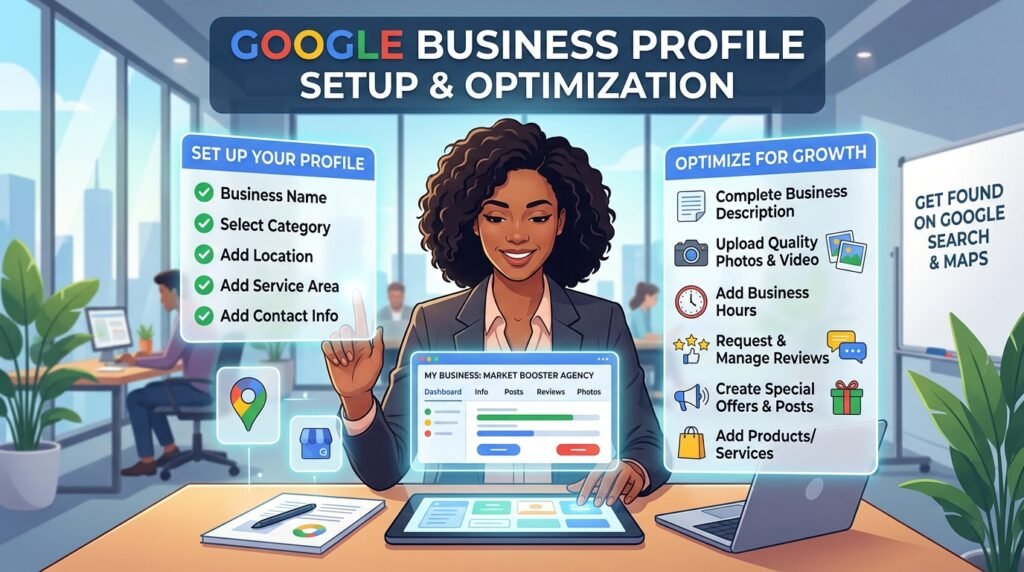
Here’s the simple flow:
- Go to Google Business Profile
- Sign in with your Google account
- Enter your business name
- Choose your business category
- Add your location (or service area)
- Enter contact details
- Finish and move to verification
That’s it. No need to overthink the first step.
One thing I always tell clients:
Choose the right primary category. This affects your visibility more than people realize.
For example, “Dentist” vs “Cosmetic Dentist” can change which searches you appear in.
Business Verification Process
Verification is where many people get stuck.
Google needs to confirm your business is real. Common methods include:
- Postcard (most common)
- Phone
- Instant verification (rare)
The postcard method usually takes 5–14 days. If it doesn’t arrive, request another don’t create a new listing (big mistake).
Common issues I’ve seen:
- Wrong address formatting
- Using a virtual office
- Entering keywords in business name
If verification fails, fix your details and try again. Don’t rush it.
Also, verification matters for local SEO. Without it, your listing won’t fully appear in Google Maps.
Optimizing Your Google Business Profile
Business Information Optimization
This is where real improvement starts.
Your goal: complete and consistent information.
Make sure your NAP (Name, Address, Phone number) is identical everywhere online. Even small differences can confuse Google.
Key things to optimize:
- Business name (no keyword stuffing)
- Accurate address
- Correct phone number
- Updated business hours
- Primary and secondary categories
From what I’ve seen, incomplete profiles rarely rank well even if the business is good.
Read Also: https://garminlive.com/top-10-b2b-marketing-trends-in-2026/
Writing SEO-Friendly Business Description
This is your chance to explain what you do but most people either ignore it or write something generic.
Keep it simple and natural:
- Mention your main service
- Add location-based keywords
- Include what makes you different
- End with a soft call-to-action
Example:
“We provide affordable AC repair services in Lahore with same-day support. Our certified technicians handle residential and commercial units. Call us today for quick service.”
No need to sound fancy. Just clear and relevant.
Adding Photos & Videos
This part is underrated.
Profiles with photos get noticeably more engagement. I’ve tested this across multiple listings adding real photos increases calls within weeks.
Add:
- Logo
- Cover photo
- Interior/exterior shots
- Team photos
- Product or service images
If possible, upload regularly. It signals activity.
Also, avoid stock images. Real photos perform better, even if they’re not perfect.
Managing Reviews & Ratings
Getting More Reviews
Reviews directly impact trust and rankings.
But most businesses don’t ask for them.
A simple approach that works:
- Ask right after service
- Send a direct review link
- Keep it polite and short
Example script:
“Hi, if you’re happy with our service, would you mind leaving a quick Google review? It really helps us grow.”
No pressure, no long message.
Consistency matters more than volume.
Responding to Reviews
Replying to reviews is not optional anymore.
It shows activity and builds trust.
For positive reviews:
“Thank you for your kind words! We’re glad you had a great experience.”
For negative ones:
“Sorry to hear about your experience. Please contact us so we can resolve this.”
Don’t argue. Ever.
I’ve seen businesses lose credibility just because they got defensive in replies.
Using Google Business Features for Growth
Google Posts
Think of Google Posts as mini social updates directly on your listing.
You can share:
- Offers
- Updates
- Events
- Announcements
Posting once a week is enough.
It keeps your profile active and improves engagement.
Q&A Section Optimization
Most businesses ignore this which is a mistake.
You can actually add your own questions and answers.
Examples:
- “Do you offer home delivery?”
- “What are your working hours?”
This helps customers and reduces repetitive queries.
Messaging & Booking Features
If available in your region, enable messaging.
People prefer quick replies over calls.
Also, if you offer appointments, turn on booking features.
Convenience = more conversions.
Advanced Local SEO Tips for GBP
If you want better rankings, focus on these factors:
| Factor | What It Means |
|---|---|
| Relevance | How well your profile matches the search |
| Distance | How close you are to the searcher |
| Prominence | Your reputation (reviews, links, activity) |
Some practical tips:
- Use local keywords naturally
- Build citations on directories
- Get backlinks from local websites
- Keep your profile active
- Encourage consistent reviews
From what I’ve seen, prominence is the real differentiator in competitive areas.
Common Mistakes to Avoid
Here’s a quick reality check I see these all the time:
- Keyword stuffing in business name
- Inconsistent contact details
- Ignoring reviews
- Duplicate listings
- Low-quality images
- Inactive profile
Worst case? Your listing gets suspended.
Google is stricter now than it used to be.
Read Also: https://garminlive.com/top-online-mapping-software-for-businesses-in-2026/
Real Example of an Optimized GBP
One small repair shop I worked with had:
- No photos
- 3 reviews
- Incomplete info
After optimization:
- Added 20 real photos
- Updated categories
- Collected 25 reviews in 2 months
- Posted weekly updates
Result?
They started appearing in top 3 Google Maps results for local searches.
No ads. Just proper optimization.
FAQs
How long does GBP verification take?
Usually 5–14 days for postcard verification.
Is Google Business Profile free?
Yes, completely free.
How to rank higher on Google Maps?
Focus on reviews, profile completeness, and local relevance.
कितनी reviews se ranking improve hoti है?
Exact number fix नहीं है, लेकिन consistent positive reviews ज़्यादा important हैं.
Can I manage multiple locations?
Yes, you can manage multiple listings under one account.
Why my business not showing on Google?
Most likely unverified, incomplete, or low activity.
How often should I update my profile?
At least once a week (posts, photos, updates).
Conclusion:
If you’re just starting, don’t try to perfect everything at once.
Do this instead:
- Set up your profile properly
- Verify it
- Complete all details
- Add real photos
- Start collecting reviews
That alone puts you ahead of many competitors.
From what I’ve seen, Google Business Profile isn’t complicated it’s just ignored.
And the businesses that take it seriously?
They quietly dominate local search.
About The Author